 OtterHoops
 · youth basketball, with the book built in
League software that
keeps the book.
Division rules, evaluation night, balanced teams, registration, gym scheduling, referees and standings, plus a tap-first Scorebook that replaces the paper book at the table. Every basket, foul, the bonus, time-outs and minutes, a live game page families can follow from the bleachers, and season stats that add up on their own. $3 per registrant, no contract.
Running a school or a single team? Start here → OtterHoops for schools
The Scorebook
The paper book, replaced.
Not just digitized.
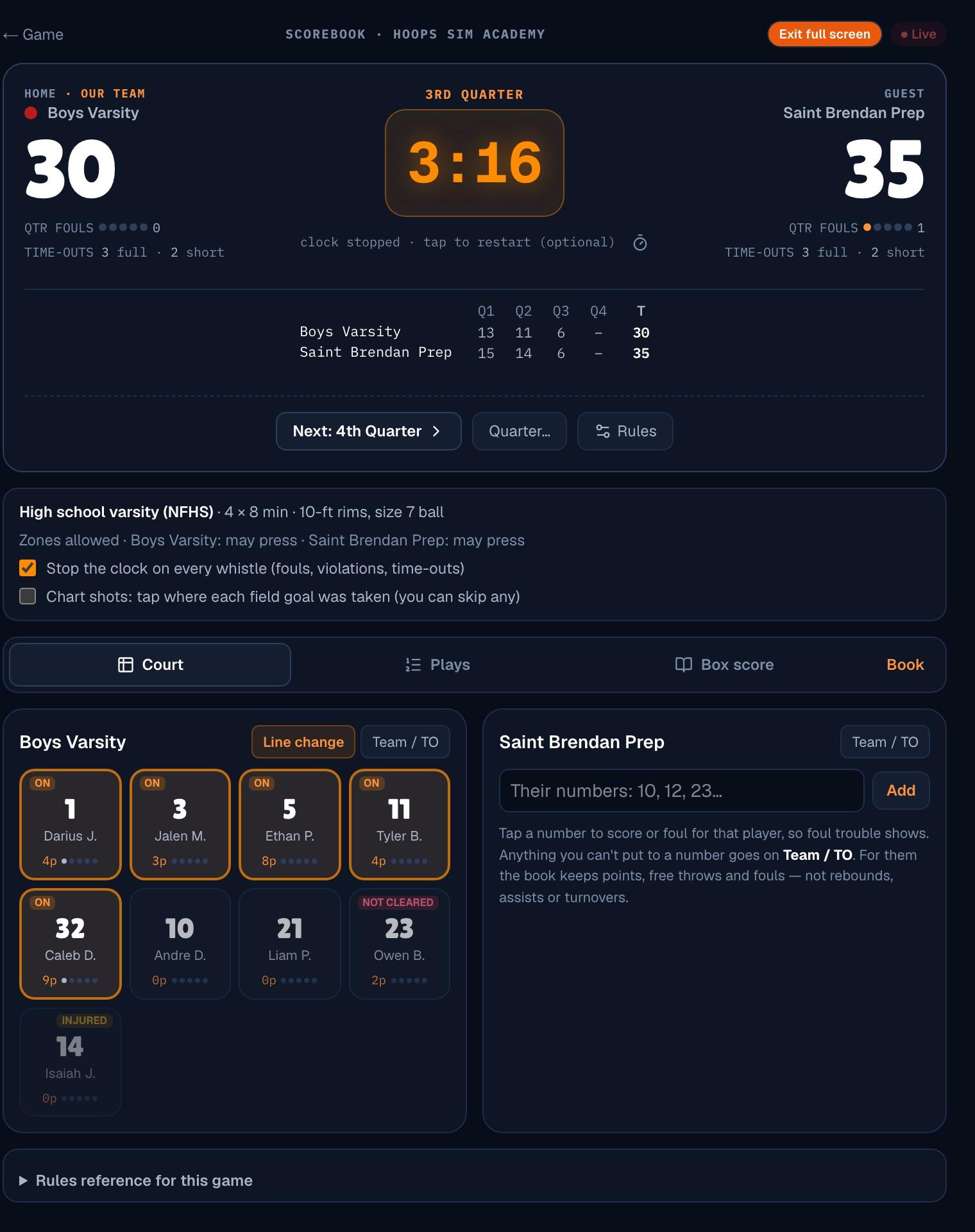
A volunteer parent at the table should never need training. Tap a player, tap what happened. The Scorebook keeps the running score and the quarter line, calls the bonus and foul trouble, counts time-outs, tracks minutes from substitutions and posts a live box score. Every tap is its own save, so two phones at the table never overwrite each other.

Tap the player, tap what happened
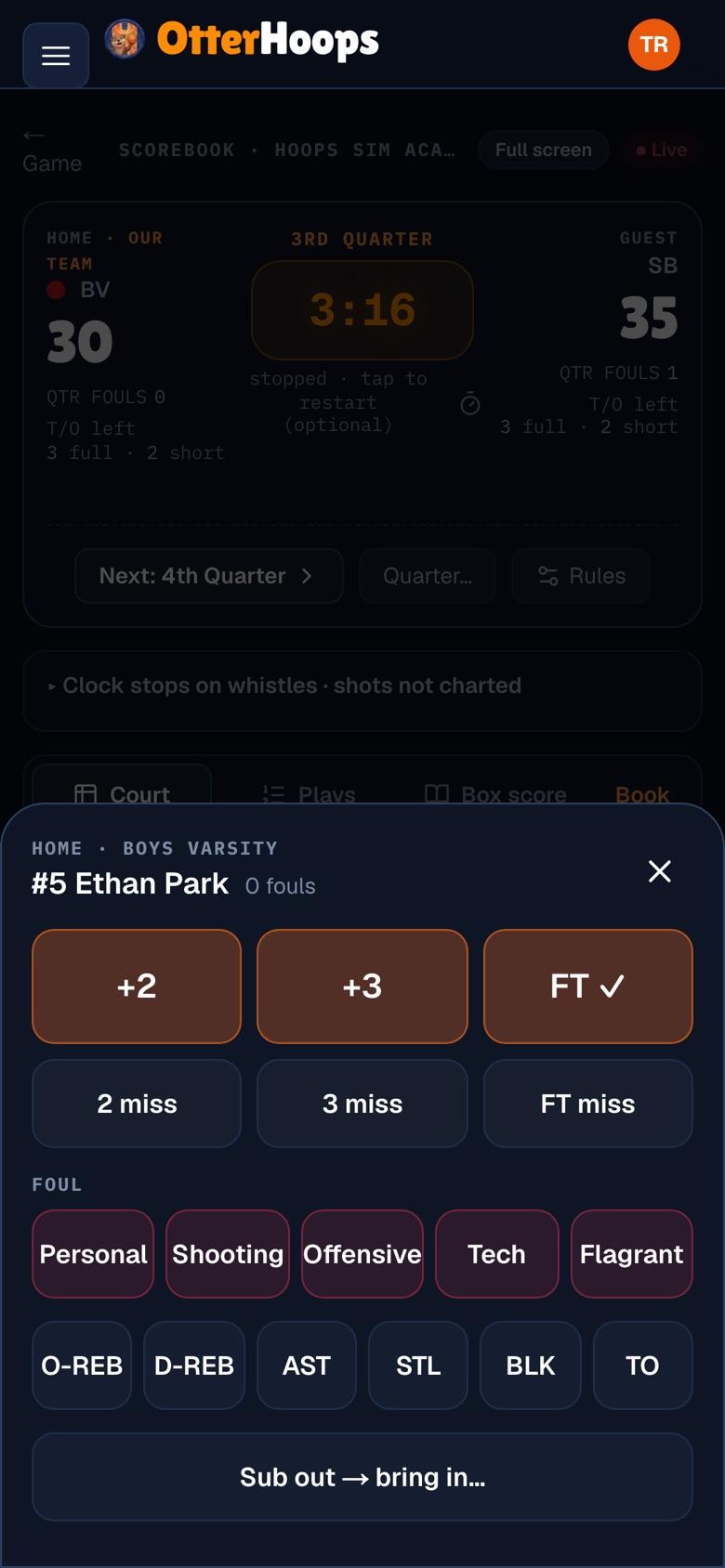
Tap a number and the pad offers +2, +3 and free throws, the misses, five foul types, rebounds, assists, steals, blocks and turnovers. A make asks “assist?” and a miss asks “rebound?” on a strip the next tap skips, and a shooting foul right after a make offers the and-one. Undo is always one tap away.
Fouls, the bonus and foul trouble, handled
Quarter fouls show as dots for both teams. Every foul opens the right follow-up: free throws, one-and-one or double bonus by your rule, foul dots on every player’s card and OUT at the foul limit. Free throws still owed are flagged until they’re recorded, even after a reload or on another phone.
Quarters, the clock and time-outs
Four quarters (or halves) at the length your division plays, a clock that runs only when you start it, and an option to stop it on every whistle. Time-outs left, full and short, for both benches, the possession arrow, halftime and overtime.
Starters, subs and real minutes
Pick five starters and every substitution is a tap, or a whole line change at once. Minutes come from the clock and the subs; a game kept without a clock reads in quarters played, never invented minutes.
The other team, even if they’re not on the app
Type their numbers once and score, foul and track foul trouble by number. Anything you can’t put to a number goes on the team line, and the box score says honestly what wasn’t kept.
Signed off, then official
When the game is Final, the coach signs the book and families see the box score as official. Need a fix? Amend the book: tap the play, change it, sign again. The printable book page and a CSV are ready for the office.
Practice before the real thing
The practice scorebook on your team page runs a whole game: nothing is saved to the league, no family is notified, and none of it counts toward stats or standings.
A bad gym connection doesn’t lose plays
Keep tapping: plays save in order and are kept on the phone, so if the page closes they go again when you reopen the Scorebook.
One tap opens the pad
Tap #5 and every stat for him is a thumb away, with his fouls beside his name.
Live in the bleachers
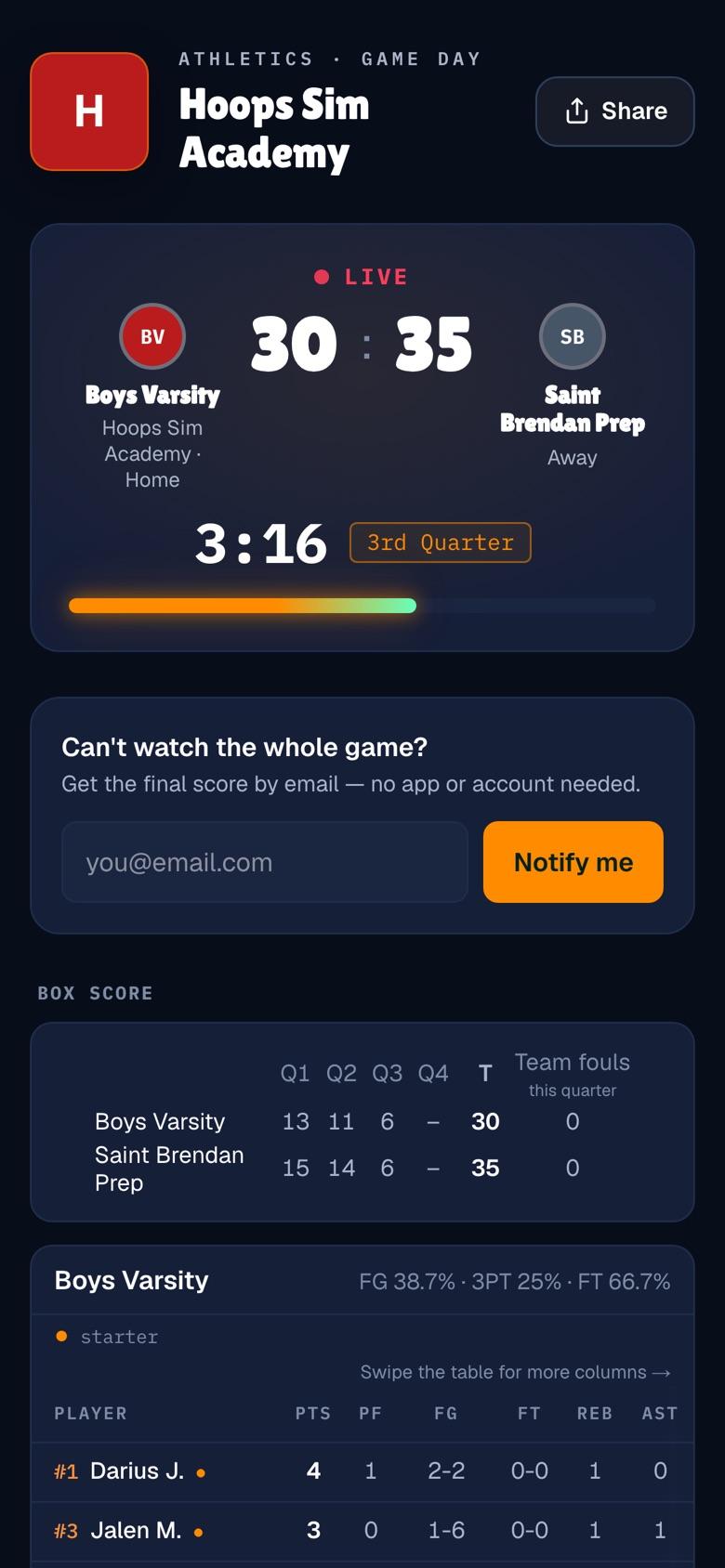
The public game page follows the book: score, clock, quarter and box score, no refresh. Can’t stay? Get the final score by email.
What a parent opens
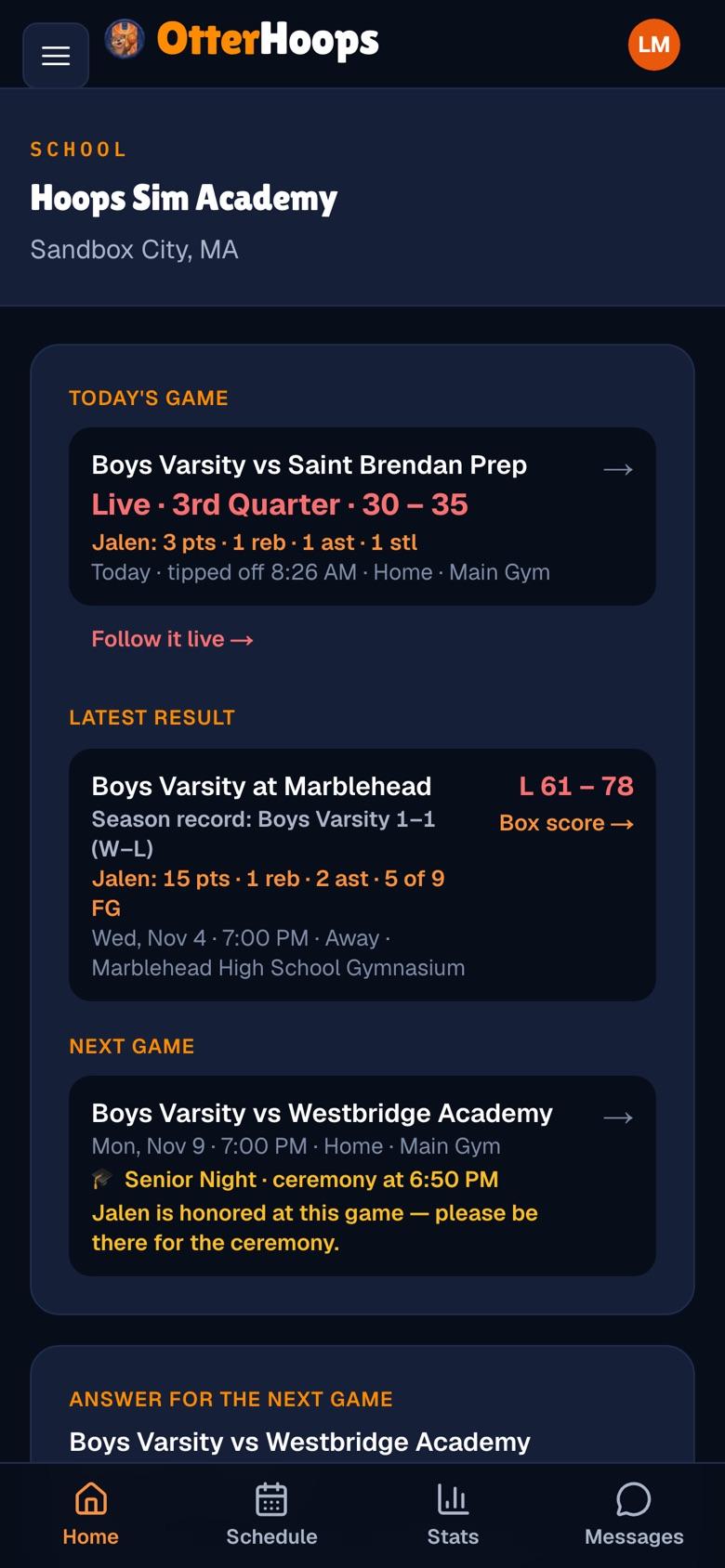
Today’s game, live, with her own child’s line; the latest result; and the next game.
Box scores & stats
Every game adds up. On its own.
The box score is the book: the quarter line, team fouls, minutes, points, rebounds, assists, steals, turnovers, shooting splits, plus/minus and a shot chart for each team. Season leaders and every player's season line build themselves from the games, with a game log behind each name.
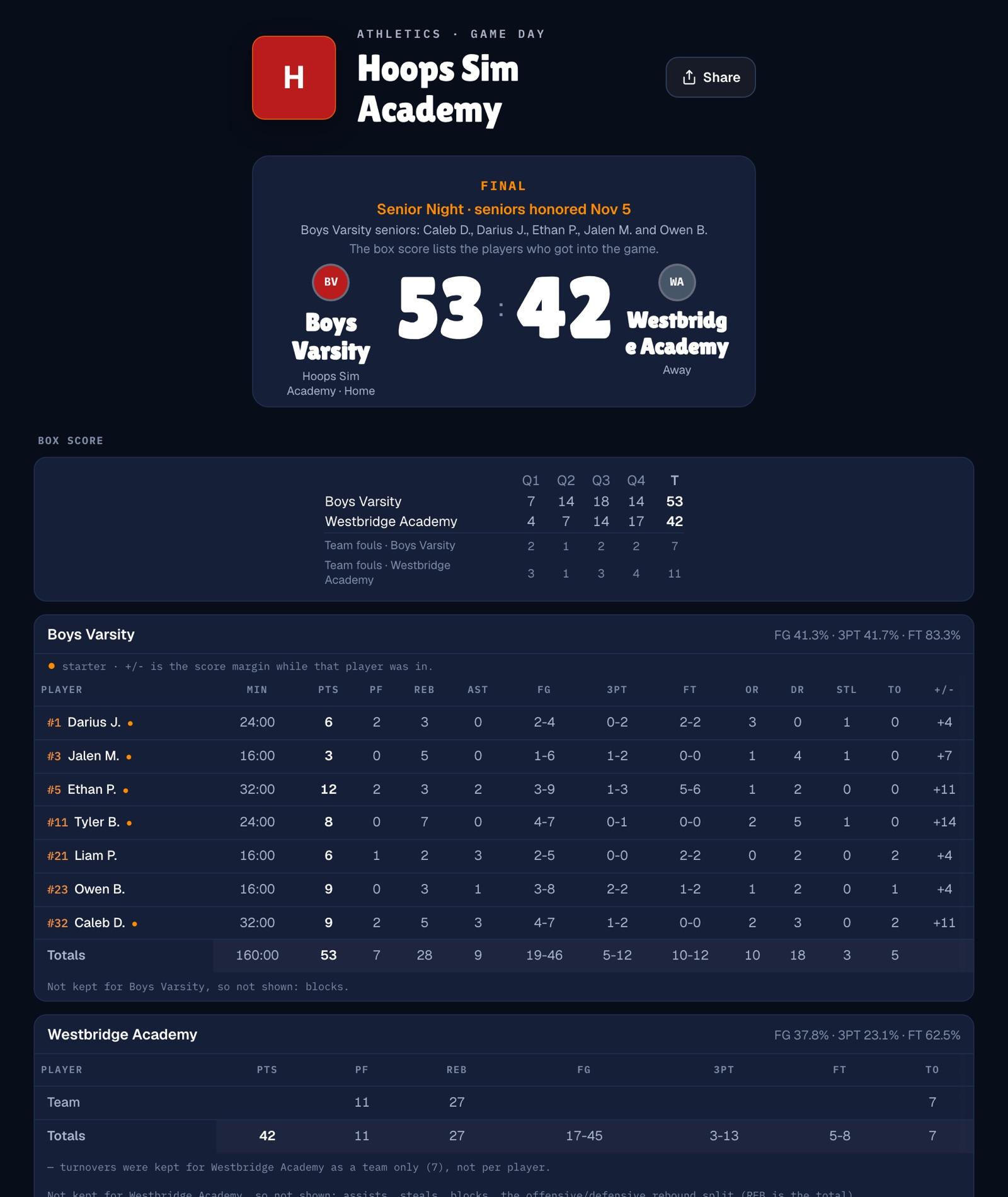
The box score, signed off
Starters marked, honest footnotes for what wasn’t kept, and a line when the coach signs the book. Print it, or download it as a CSV.
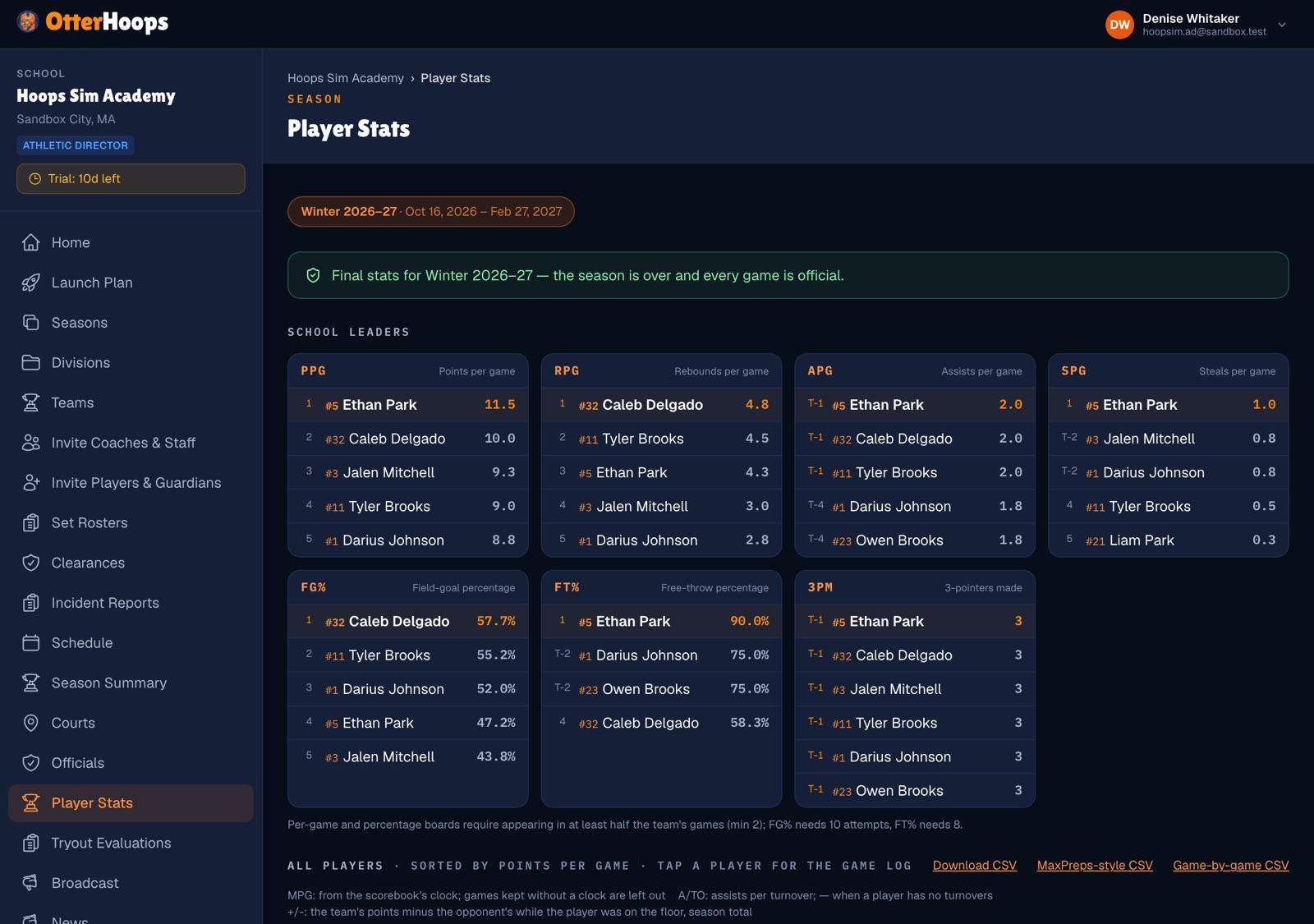
Player stats and leaders
Points, rebounds, assists and steals per game, field-goal and free-throw percentage and threes, with a CSV, a MaxPreps-style CSV and a game-by-game CSV.
Run the season
From evaluation night to the championship game.
Everything a volunteer board does between the first sign-up and the last trophy, built for basketball. It runs on the same platform as OtterSoccer and OtterFutsal, live with real leagues, with one family login across every product.
Division game formats, in plain words
Presets from K–2 (8-foot rims, size 5 ball, running clock, no press, a mercy rule that freezes the public scoreboard) up to NFHS varsity. Change periods, overtime, bonus, time-outs, foul-outs and defense rules per division, and the scorebook follows.
Evaluation night that works in a gym
Bibs, a 1–5 scale explained for every skill, blind scoring, walk-ons added on the spot and a printable check-in sheet. Rankings flag evaluator disagreement and handle ties, with a CSV when you’re done.
Balanced teams, siblings kept together
Distribute evenly by evaluation or by age, with grade mix, first-timers, team averages and the strongest-to-weakest gap shown before anything moves. Siblings and coaches’ kids stay together, and nobody is emailed until you publish.
Registration with a clear waitlist
Every pending player sees their own spot (“Spot 41 of 42”), approving past the cap asks first, and basketball questions like carpool, school and experience feed straight into team balancing.
Gyms, courts and the schedule
Schedule by venue and court with hour-long slots, catch double-bookings, generate a whole season of games, and publish a schedule families can add to Apple or Google Calendar.
Standings that look like basketball
Win–loss records by winning percentage, points for and against, tie-breakers you can see and reorder, and no standings at all for the divisions that shouldn’t have them.
Who it's for
A page for every seat in the gym.
Everyone sees what their job needs, and nothing they shouldn't. Coaches and officials are always free.
League president
Rules, evaluations, balancing, schedule and standings in one place, with a season summary that shows who is short on playing time and a one-tap note to the coach.
Registrar
An inbox with status tabs, waitlist spots per division, the parent’s view of the form, and answers rolled up by team.
Treasurer
Collected, owed, waived and refunded in one ledger, family-grouped dues, pay by check, referee pay owed, and a board packet that checks its own numbers.
Referee assignor
A day grid for assigning a whole Saturday, clash detection when one ref is booked on two courts, an availability matrix, and drafts that go out in one email.
Referees
Referee HQ with offers that know about clashes, the division’s rules on the game screen, and an honest pay ledger.
Coaches
Coach HQ, the Sideline for fair minutes, the phone scorebook, scouting notes and a practice planner, with box scores after every game.
Families
Next game, RSVP for each child, the live score, your kid’s box score and shot chart, dues, and tournament weekends with the hotel deadline. The final score by email, too, with no account needed.
High schools
Varsity and JV under one athletic office: tryouts, clearances, athlete logins with parents reading along, Senior Night and a season wrap-up. NFHS formats and signed-off box scores.
OtterHoops for schools →Teams & schools, too
Not running a league? Run a team, or a school program.
The same basketball-aware product, with courts, quarters and the Scorebook, sized for one team or one athletic department. Everything OtterHoops does for a high school →
Single basketball team
7-day free trial, no card
Roster, schedule, RSVPs and team chat, plus the Scorebook and the Sideline for box scores and fair minutes. Tournament weekends with the hotel deadline, tryouts and dues for travel teams. Parents never have to install anything.
School basketball program
14-day free trial, no auto-renewal · $199 for each additional sport
Varsity, JV and up to 6 teams with unlimited athletes and coaches. Tryouts and cuts, clearances and family paperwork, athlete logins, Captains’ Chat, the Scorebook at every game, Senior Night and the season wrap-up.
Pricing
Simple. No surprises.
$3 per registrant, per season, collected automatically from the registration payment. You never write OtterHoops a check.
No credit card to start. Standard Stripe processing applies to paid registrations.
What’s included
Every feature, explained.
Each one links to a help article that shows exactly how it works.
Your season, step by step
- League President: your season, step by step
- Registrar: your season, step by step
- Treasurer: your season, step by step
- Division Coordinator: your season, step by step
- Referee Coordinator: your season, step by step
- Courts Coordinator: your season, step by step
- Risk Coordinator: your season, step by step
- Director of Coaches: your season, step by step
- Secretary: your season, step by step
- Coach: your season, step by step
- Referee: your season, step by step
- Parents: your season, step by step
Getting started
Seasons, divisions & teams
Registration & payments
- How families register
- Opening and closing registration
- Waivers and e-signatures
- Your own registration questions
- Age groups and who can register
- Waitlist and interest list
- Team entries and join codes
- Invitations
- Discounts, coupons, credits and fee waivers
- Getting paid: Stripe, fees and payments
- Refunds, withdrawals and disputes
- Financials for treasurers
- Import registrations from a spreadsheet
Schedule & courts
Game day
- The Sideline: lineups, subs and fair playing time
- Keeping score with the Scorekeeper
- The basketball Scorebook
- The volleyball Table
- The hockey Rinkbook, game sheet and Lines board
- Stopped games, suspensions, forfeits and delays
- Results, standings, stats and playing time
- RSVPs, game reminders and weather
- The public game page and sharing a game
Referees
Messaging & notifications
Safety & compliance
Questions, answered
What basketball leagues ask first.
What does OtterHoops cost for a league?
$3 per registrant per season. There is no monthly fee and no contract, and coaches, referees, admins and staff are free. Card processing applies only to paid registrations.
How it works →How long does it take to start a league?
About a minute to create it: three questions on the website. Then the Launch Plan walks you through nine tasks, from league basics to building the schedule.
How it works →Does OtterHoops keep a basketball box score?
Yes. The Scorebook records every shot, foul, rebound, assist, turnover and sub, and builds the box score and Player Stats from it. After the Final, each coach presses "Verify the book" for their own team.
How it works →Does the schedule catch double-booked teams and courts?
Yes. A team in two places at once is always refused. Two games on one court at the same time is a warning an admin can choose to keep.
How it works →Is there help planning practices?
Yes. The Practice Planner builds a session from a drill library for your sport. Pick an age, a length and a focus, then press “Generate session”. Every activity comes with a setup and coaching points.
How it works →Does the Sideline track fair playing time?
Yes. Each player's card shows minutes against an even share, and time in goal is counted separately from field time. Coaches see the season on the team's Development page.
How it works →Do we get a league website?
Yes. Every league has a public site with its schedule, standings, teams, news and registration. You choose its colors, banner and which sections show.
How it works →Is there a phone app?
Yes, for iPhone and Android. It shows the same live site, so it is always up to date. Starting a new league or team, billing and banking setup are on the website only.
How it works →More answers in the help center.